
Calibration Tasks
About Calibration Task
A Calibration Task record stores details about a calibration task that should be performed by a given user for Calibration Management. Specifically, these records store scheduled dates for the next time the calibrations should be performed.
Calibration Tasks are linked to Calibration Profiles. After you link a Calibration Task to one or more profiles, APM creates a copy of the task for each Profile and Asset combination.
For example, suppose you have two Calibration Profiles, Profile 1 and Profile 2, which are associated with the Equipment and Template, as shown in the following diagram:
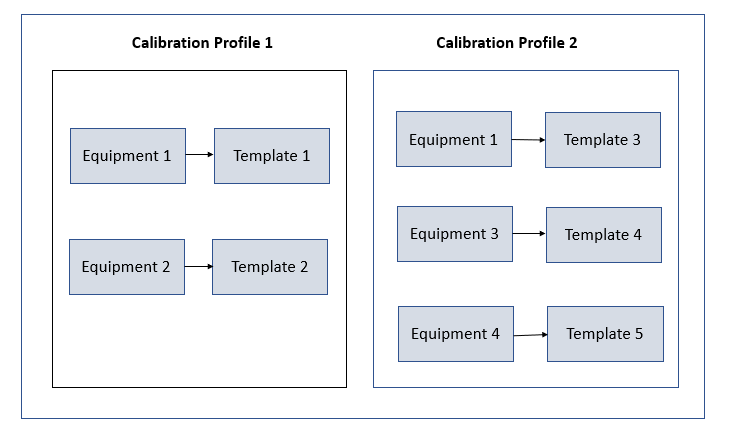
Note that Equipment 1 is associated with Profile 1 (Template 1) as well as Profile 2 (Template 3).
Suppose you have created Task 1 to link to all the Equipment records in Profile 1 and Profile 2. APM creates four Calibration Tasks, and links them to the Equipment and Template as shown in the following image. Note that since Template 1 and Template 3 are linked with the same Equipment, the same Task will be linked to both the Templates.
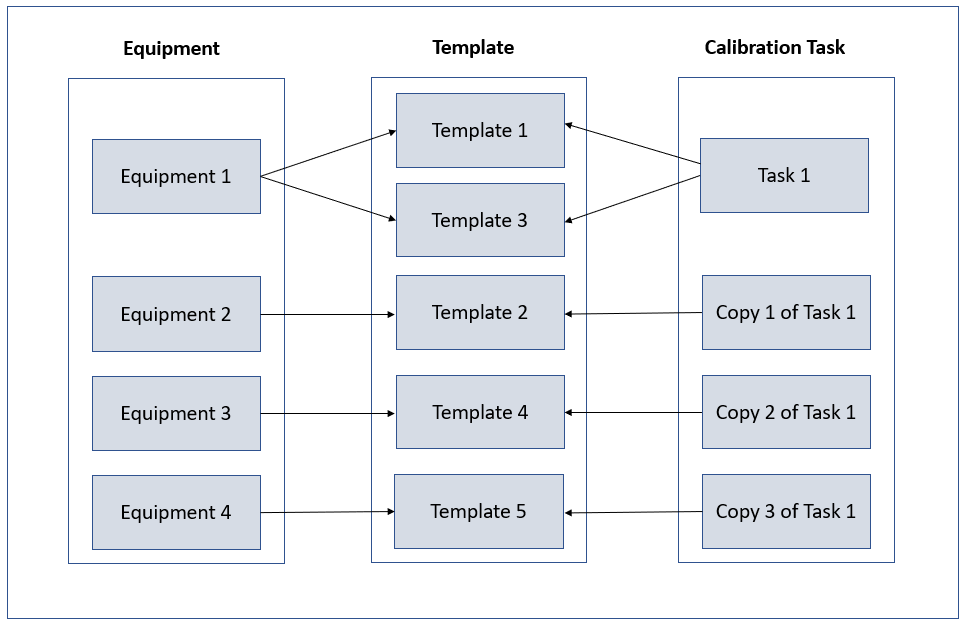
Each copy of the Calibration Task appears in the Calibration Queue section of the Calibration Management Overview page.
After a calibration is performed and the Calibration Event that is linked to the Asset is closed, the Calibration Task is updated such that:
- The Last Date field reflects the date on which the calibration event was performed.
- The Next Date field is the date on which the calibration is due for that asset.
About Task Execution
When a Calibration Task is addressed by a Calibration Event, it is beneficial to capture the snapshot of the task and event data at the time when the calibration was completed, for future reference. Task Execution aggregates fields from both the event and task when the calibration Admin approves the calibration event record
During this process, the following activities occur within the system:
- The Calibration Task record transitions to the Executing state.
- A new Task Execution record is created and field values from both the task and event are mapped to the execution record.
- The Task Execution is related to both the Calibration Task (via Has Task Execution) and to the event record (via Has Event Execution).
- The Calibration Task record is transitioned back to the Scheduled state.
- During this process, the Calibration Task's Last Date and Next Date fields are updated based on the Completion Date of the event. At that time a secondary revision will be created to document the latest changes.
- The policy Calibration Task Execution controls the mapping of task and event fields to execution records. To map additional fields from either task or event to the Task Execution record, add them to the Task Execution family and modify the policy accordingly. Ensure that input nodes and return nodes remain unchanged.
About Deferring a Calibration Task
There may be instances when a task cannot be completed by the specified Next Date due to various reasons. In this scenario, APM provides a workflow to request a deferral of the task. The deferral follows a review and approval process allowing a Calibration user to request the deferral by providing a reason and selecting the desired deferral date. The Calibration Administrator can review the request and decide to approve or reject it.
Upon approval of a deferral request, the following fields are updated on the Calibration Task:
- Original Next Date: Updated with the value of the Next Date field on the task. This value is only updated upon the approval of the first deferral within this cycle and is retained until the task is executed.
- Next Date: Updated with the value of the Deferred Date field on the approved Deferral.
- Deferred Next Date Basis: Updated with the ID of the approved Deferral.
- Is Deferred: Updated to true to indicate that a Deferral has been approved for this task.
- Reason: Appended with the value from the Comments field along with the Deferral ID and current date of the approved Deferral.
You can create and approve multiple Deferral records for a given Calibration Task if required. However, the number of times a task can be deferred is restricted and controlled by the Deferral Configuration for the Calibration Task family.
When there is at least one approved Deferral against a task and the task is either addressed by a completed Calibration Event or the Next Date field is updated with a greater value, the following occurs:
- The Original Next Date, Deferred Next Date Basis, and Is Deferred fields are cleared.
- Any approved Deferrals are moved to the Archived state.
Access the Related Records of a Calibration Task
About This Task
Procedure
Access a Calibration Task
Procedure
You can also navigate to Manage Calibration Tasks page from the Calibration Profile datasheet.
- In the TASK ID column, select the link for the task that you want to access.The datasheet for the selected Calibration Task appears.Note: As needed, you can modify the values in the available fields, and then select
 to save your changes.
Access the Deferrals of a Calibration Task
Before You Begin
Procedure
Create a Deferral for a Calibration Task
Before You Begin
Procedure
- As needed, enter values in the available fields, and then select .The Deferral is created, and the State Management of the Deferral appears.
What To Do Next
Delete the Deferral of a Calibration Task
Before You Begin
About This Task
- Approved
- Rejected
- Archived
Procedure
- Select
 .A message appears, asking you to confirm that you want to delete the Deferrals.
Link a Calibration Task to a Profile
Before You Begin
About This Task
Procedure
You can also navigate to Manage Calibration Tasks page from the Calibration Profile datasheet.
Results
What To Do Next
- If you are performing an automated calibration, send the work order to the documenting process calibrator.
- If you are performing a manual calibration, perform the calibration, and then create a manual calibration task to store the readings.
Unlink a Calibration Task from a Profile
About This Task
Procedure
Results
- In the Calibration Management Overview page, in the Calibration Queue section, the records that correspond to the tasks that you have unlinked are removed from the list.
Filter Calibration Tasks
About This Task
Procedure
- In the section, select
 , and then select the date range option to filter the tasks.Note: The list of date range options is based on the settings in the Calibration Admin Preferences page. For more information, refer to Set the Default Date Range for Calibration Queue.
What To Do Next
Perform Manual Calibration
Before You Begin
About This Task
Procedure
- As needed, enter values in the available fields, and then, in the datasheet, select .The Calibration is created and linked to the Calibration Task, Asset, and the Applied Profile (that is, template linked to the Asset).
What To Do Next
- Change the State of a Calibration
- Propose a recommendation to improvise the calibration strategy.
Delete a Calibration Task
About This Task
Procedure
- Select
 , and then select Delete.The calibration task is deleted.