
ActiveX Event
Note:
Each ActiveX control has its own set of events. See the documentation for the ActiveX control you plan to use.
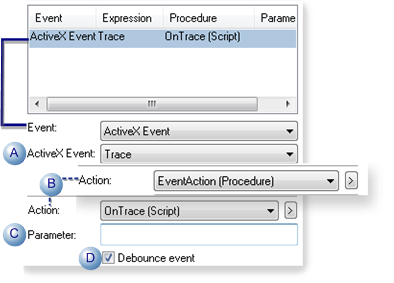
| Field | Description | ||
|---|---|---|---|
| A | ActiveX Event | The drop-down list contains events that are available in the ActiveX control. | |
| B | Action | Contains a drop-down list of existing procedures and scripts. Use either of the following. | |
| Procedure | |||
| Script | |||
| C | Parameter | Available parameters depend on the selected ActiveX event. Can be used if the selected ActiveX event invokes a script. (The event can invoke a script directly or through a procedure. | |
| D | Debounce event | Check | |
| Clear | |||
|
Note:
This makes the queue's event/action sequencing predictable and avoids situations where many events could trigger actions and consume unacceptable levels of CPU and memory.
When debouncing is enabled, the event/action queue is always processed one action at a time; the current action must be completed before the next action can start. |
|||